
Calls don't stop when your business closes for a holiday. And if your AI assistant doesn't know you're closed, it treats the day like any other: booking appointments into an empty office, or transferring callers to a front desk where nobody is picking up.
Closed days are how you tell your AI Secretary about the exceptions: holidays, early closes, the week between Christmas and New Year's. Set them once, and on those days every call and text is handled accordingly: the caller is told you're closed and why, offered a message or another day, and never booked into a closed office.
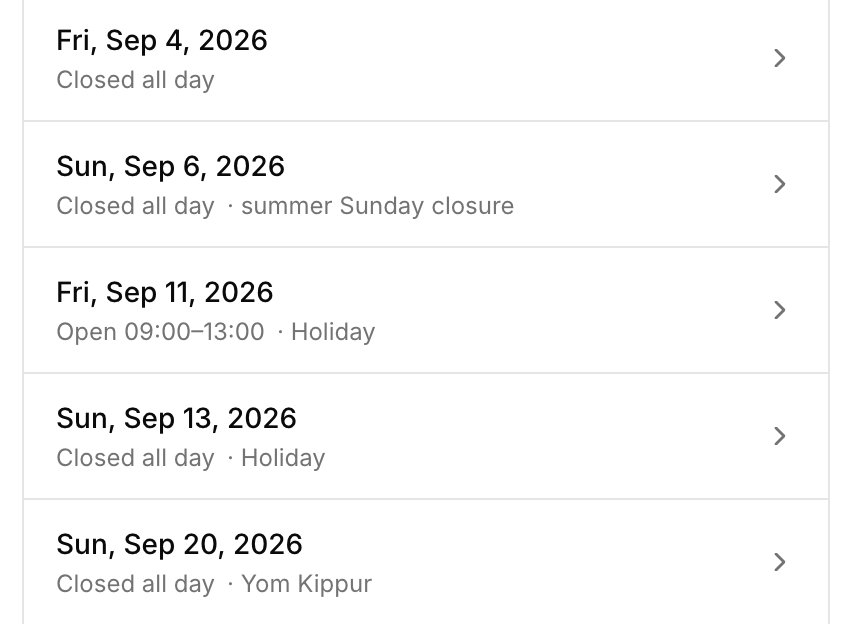
What a closed day changes
On a day you've marked closed, your assistant:
- Tells callers you're closed, by name. Give the closure a label and callers hear "we're closed for Thanksgiving" instead of just "no availability."
- Won't book appointments on that day. A closed date never shows up as an option, and it can't be booked even if a caller pushes for it.
- Won't transfer calls to an empty office. If nobody's there, your assistant says so instead of ringing a desk no one will answer, with an exception for on-call lines (more below).
- Still does everything else. Messages get taken, questions get answered, and callers get offered another day.
Special hours, multi-day closures, and recurring holidays
A closed day doesn't have to be a single fully closed date:
- Special hours. If you close at 1 PM on Christmas Eve, mark the day as special hours instead of closed: your assistant only offers and books times inside that window, and outside it the day is treated as closed.
- Multi-day closures. One entry covers December 24–26, or the whole stretch between Christmas and New Year's.
- Recurring holidays. Mark a closure as recurring and it comes back every year on its own, either on a fixed date like December 25, or by a rule like "the fourth Thursday of November," so you never re-enter Thanksgiving.
- Carve-outs. A closure doesn't have to shut everything off. You can keep transfers available on a day the office is closed (someone's on call), or keep appointments bookable on a day nobody's answering the phone (an admin day where the calendar still fills). And a specific transfer destination (an on-call or emergency line) can be marked reachable even on closed days.
Setting it up
Closed days have their own page in the app, and any member of your team can add or edit them, not just account admins. If the front desk learns the office is closing early on Friday, they can update it themselves right away.
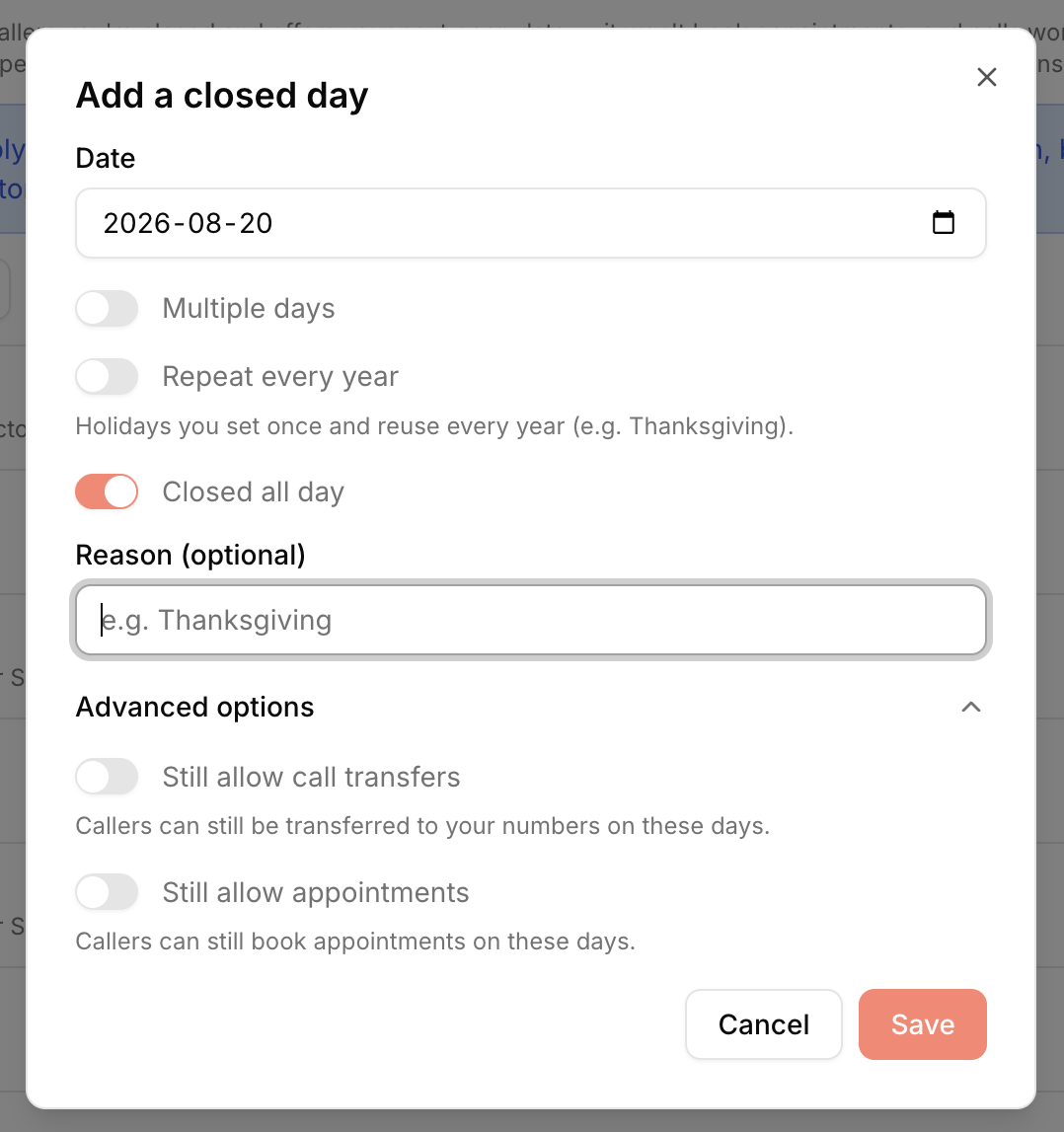
You can also add a closed day without opening the app: tell your assistant directly. On a call or chat with it, say "we're closed December 24 through 26 for Christmas." It reads the exact dates back to you (weekdays included, so a typo'd date can't slip through) and saves the closure once you confirm. Recurring rules and special hours are set up in the app.
Google Calendar, Outlook, or your EHR
How closed days interact with your schedule depends on what your appointments live in.
If your calendar is Google Calendar or Microsoft Outlook
Your AI Secretary books directly against your connected calendar, so closed days shape everything it offers: fully closed days disappear from the options, special-hours days are clipped to their open window, and a caller asking about a closed date hears "we're closed that day" rather than just finding no openings.
One thing that trips people up: subscribing to a public holiday calendar does not close your business. Plenty of businesses are open on federal holidays, so an event called "Labor Day" on your Google calendar won't stop your assistant from booking that Monday. If you're actually closed, mark it as a closed day: only a closed day tells your assistant you're closed.
If you're a clinic connected to your EHR
For practices whose scheduling runs through their EHR (eClinicalWorks, Practice Fusion, and others), there's a clean division of labor:
- Clinicians' days off live in the EHR. When the clinic stays open but one or several clinicians are out, block their time on the EHR schedule the way you already do. Your assistant follows it automatically and only books the clinicians who are in, with nothing to configure in YouSquared.
- A practice-wide closure lives in closed days. Your EHR's schedule doesn't know about your holidays: on Thanksgiving it shows a full day of open slots, so an assistant that relied on it alone would book patients into a closed clinic. Mark the holiday as a closed day and your assistant won't book it. It also tells the caller why: "the clinic is closed for Thanksgiving that day."
The app keeps the two straight for you: the closed days page reminds EHR-connected teams that single-clinician time off belongs in the EHR, and vice versa.
Small details that matter
- Closures follow your clock. A closed day goes by your business's timezone, not the caller's, so a late-night caller three timezones away is never told the wrong day.
- Special hours fit whole appointments. An appointment has to fit entirely inside the open window: a 45-minute visit doesn't get squeezed across your 1 PM close.
- Closures are announced in advance. Your assistant knows about upcoming closures on every call, so a caller booking next month never gets offered the day you'll be closed.
FAQ
Do I have to re-enter holidays every year? No. Mark a closure as recurring and it comes back automatically, whether it's a fixed date (December 25) or a floating one (the fourth Thursday of November).
I added a holidays calendar to my Google Calendar. Isn't that enough? No. A subscribed holiday calendar only marks what day it is, not whether your business is closed. If you're closed on a holiday, add it as a closed day.
What does a caller actually hear on a closed day? That you're closed, with the reason if you labeled it, followed by an offer to take a message or find another day. For multi-day closures, your assistant tells them how long the closure runs.
Can urgent calls still get through on a holiday? Yes, two ways: allow transfers on that specific closure, or mark an on-call/emergency destination as reachable even on closed days. Everything else still gets a message taken.
We're a clinic. Where do individual clinicians' days off go? In your EHR, same as always. As long as the clinic itself stays open, block each clinician's time on their EHR schedule and your assistant picks it up automatically. Closed days are only for practice-wide closures.
Can I add a closed day without opening the app? Yes. Tell your assistant the dates on a call or text. It reads them back and saves them once you confirm.
Get started
Closed days are available today for every assistant. Start free on the web (no card required) or book a demo.